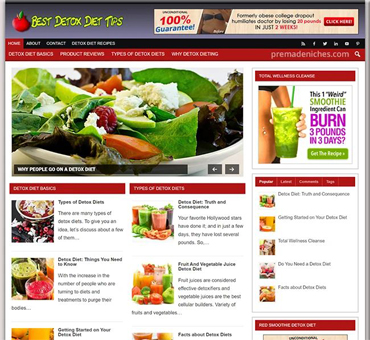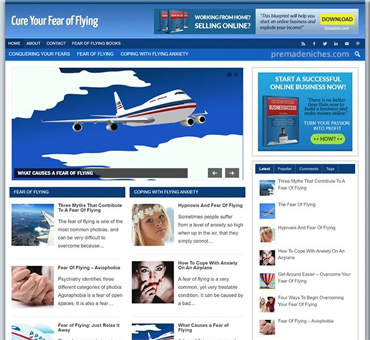


Turnkey WordPress Websites for Fast Business Launches
by in Turnkey & Ready-Made WordPress Websites onTurnkey WordPress Websites for Fast Business Launches
A turnkey WordPress website gives a business a ready-to-customize online foundation instead of requiring every page, setting, and technical decision to be built from scratch. It can include hosting coordination, a configured WordPress installation, a responsive theme, essential pages, contact forms, basic search visibility settings, security measures, and guidance for adding content. The goal is not merely to provide an attractive template. The goal is to shorten the distance between choosing a digital presence and confidently using it to explain, promote, and operate a business.
For a new company, this approach reduces the number of decisions competing for limited time. For an established company, it can make a redesign more manageable without interrupting normal work. However, “turnkey” should not mean generic, locked, or abandoned after delivery. A useful solution combines a dependable technical setup with enough flexibility for the business’s audience, offer, brand, and future plans.
Turnkey WordPress Websites: What a Turnkey WordPress Website Includes
A turnkey website is a prepared website package that is configured for practical use. The exact scope varies, so buyers should inspect the deliverables rather than rely on the label alone. A credible package commonly covers the following components.
WordPress installation and configuration
WordPress is installed on the chosen hosting account, connected to the domain, and configured with suitable administrative settings. Basic options may include site title, time zone, permalink structure, user roles, media settings, and a secure administrator account. The website should also use encrypted connection technology through HTTPS, subject to the hosting arrangement.
Design and page structure
The site typically includes a responsive design that adapts to phones, tablets, and desktop screens. Common pages include Home, About, Services or Products, Contact, and a privacy-related page. Navigation should be clear, headings should follow a sensible hierarchy, and calls to action should guide visitors toward an appropriate next step, such as requesting a quote, booking a consultation, or purchasing an item.
Content preparation
Some packages include professionally written starter copy, while others provide placeholder text. This distinction matters. Generic wording can demonstrate layout, but it rarely explains a particular company persuasively. The strongest implementation uses the client’s actual audience, services, proof, geographic area, policies, and brand voice. Where content is supplied by the business, the provider should format and publish it consistently.
Functional essentials
A practical website may include a contact form, spam protection, social profile links, image optimization, analytics integration, map or location information, and an email subscription connection. Online stores require additional elements, including product organization, payment configuration, shipping rules, tax settings where relevant, order notifications, and customer account options. These features should be tested before launch rather than assumed to work because a plugin was installed.
Why Businesses Choose a Turnkey Approach
The primary advantage is reduced implementation time. Building independently involves comparing hosting companies, selecting themes, evaluating plugins, learning WordPress settings, preparing content, resolving layout problems, and checking mobile behavior. A turnkey service groups those decisions into a defined process. That can be valuable when a website supports a launch, campaign, opening, recruitment effort, or change in business direction.
Another advantage is coherence. When one team handles structure, styling, forms, and technical configuration, fewer mismatches occur between components. A page may load correctly, the visual design may support the written message, and the form may connect to the intended inbox. Coherence does not eliminate the need for review, but it makes review more productive.
A prepared website can also lower the barrier to ongoing ownership. WordPress is widely used and supports editing through an administrative dashboard. After handover, a business can update service descriptions, publish articles, add images, or change contact details without requesting a new custom build for every small revision. The degree of independence depends on training, permissions, theme choices, and the quality of the editing experience.
Speed should not be confused with haste. A fast launch is useful only if visitors can understand the offer, trust the organization, and complete the desired action. A turnkey process should therefore prioritize the small set of pages and functions that matter most, then create a path for future improvements.
Choosing the Right Package
Before selecting a provider, define the website’s job. A local consultant may need credibility, service explanations, testimonials, and consultation requests. A restaurant may need menus, location information, opening details, reservations, and mobile-friendly contact options. A nonprofit may need donation information, event updates, volunteer forms, and clear explanations of its mission. A store needs a dependable purchasing journey. Each use case requires a different scope.
Ask for a written list of inclusions and exclusions. Clarify the number of pages, revision rounds, forms, integrations, stock images, copywriting, accessibility considerations, training sessions, and post-launch support. Confirm whether the domain and hosting remain in the business’s control. Ownership should be understandable, especially when premium themes, plugins, licenses, or accounts are involved.

Review the editing workflow. Can staff change a phone number without disturbing the layout? Can they add a page, crop an image, or update a price safely? A visually impressive site becomes expensive if every minor adjustment requires a developer. Conversely, a complex editing system may create mistakes. The ideal balance gives ordinary users controlled flexibility while reserving structural changes for experienced administrators.
Consider future requirements as well. A simple brochure site might later need appointments, a learning area, multilingual content, memberships, or commerce. The initial system should not be overbuilt, but it should avoid choices that make likely expansion unnecessarily difficult. A provider should explain which additions are straightforward, which require redesign, and which depend on third-party services.
The Launch Process
1. Discovery and planning
The process begins with goals, audience, competitors, content, brand assets, and required actions. Useful planning identifies what visitors need to know before contacting or buying. It also establishes a primary call to action and a realistic page hierarchy. A short, focused discovery phase prevents attractive but irrelevant features from consuming time.
2. Content and design direction
The business supplies logos, photographs, service details, policies, and preferred examples. The provider then translates those materials into a visual direction. Typography, colors, spacing, imagery, and button styles should reinforce clarity rather than compete for attention. When content is incomplete, the team should identify gaps clearly instead of filling important claims with unsupported language.
3. Build and configuration
Pages are created, templates are styled, forms are connected, and required extensions are configured. The site should be built with performance in mind: appropriately sized images, limited unnecessary scripts, and sensible plugin selection. Accessibility deserves attention during this stage, including readable contrast, descriptive links, keyboard-friendly controls, and meaningful alternative text for informative images.
4. Review and testing
The client should review text, links, images, contact details, legal information, and calls to action. Testing should cover multiple screen sizes and common browsers. Forms need real delivery tests, including confirmation messages and notification recipients. If the website accepts payments or bookings, test transactions should be handled carefully and verified from both the customer and administrator perspectives.
5. Launch and handover
At launch, the domain points to the correct hosting environment, HTTPS works, redirects are checked, and the final backup is created. The business should receive administrator access, license information, documentation, and instructions for routine tasks. A handover meeting can explain how to edit pages, manage media, respond to form submissions, and update safely.

6. Post-launch improvement
The first version is a starting point, not a permanent verdict on the business. Review visitor questions, form submissions, sales behavior, and team feedback. Improvements might include clearer service comparisons, stronger examples, better internal links, updated photographs, or a shorter inquiry form. Changes should be based on observed needs rather than constant visual experimentation.
Performance, Security, and Maintenance
A WordPress website requires care after launch. Core software, themes, and plugins may receive updates that address compatibility issues, security weaknesses, or new capabilities. Updates should be applied through a controlled process, ideally after a backup and with a way to restore the previous version. Automatic updates can be convenient, but they do not replace review, monitoring, or recovery planning.
Backups should be stored separately from the live site and tested periodically. A backup that cannot be restored is not a dependable recovery plan. Access should be limited to people who need it, with strong unique passwords and, where available, multi-factor authentication. Unused accounts and plugins should be removed rather than left dormant.
Performance depends on hosting, theme complexity, images, scripts, and third-party services. Useful improvements may include image compression, caching, efficient fonts, and removal of unnecessary extensions. No single optimization guarantees fast pages on every connection. Testing should reflect how real visitors use the site, particularly on mobile devices and slower networks.
Accessibility is both a practical responsibility and a usability advantage. Clear headings, adequate contrast, descriptive form labels, visible focus states, captions where needed, and logical keyboard navigation help people interact with content in different ways. Accessibility should be treated as an ongoing quality standard, not a decorative add-on applied just before launch.
Content That Converts Without Overpromising
Persuasive website copy begins with relevance. State what the business offers, whom it helps, and why a visitor should take the next step. Replace vague claims with concrete explanations. “We provide support” is weaker than an explanation of the problem addressed, the process involved, and the outcome the customer can reasonably expect.
Trust grows through evidence and transparency. Explain qualifications when relevant, show appropriate examples, describe the process, and provide complete contact information. Testimonials can help when they are genuine and used with permission. Avoid guarantees that the business cannot control. Clear limitations often make a company appear more credible because visitors understand what is and is not included.
Calls to action should match visitor readiness. A first-time visitor may prefer an informative guide or service overview, while a ready buyer may want a booking button or checkout link. Repeating a single aggressive prompt on every page can feel unnatural. Use specific, descriptive labels such as “Request a project estimate” or “View available appointments.”
Images should support meaning. Use relevant photographs, diagrams, product views, or team images rather than decorative files that slow the page. Provide useful alternative text for informative images, and leave purely decorative images appropriately identified for assistive technology.
Common Limitations and Risks
Turnkey does not automatically mean custom. A package built from a standard theme may offer limited control over unusual layouts or specialized workflows. That is not necessarily a weakness for a small business, but it should be understood before purchase. Custom requirements should be listed early so the provider can assess feasibility and cost.
Low initial effort can also conceal recurring expenses. Hosting, domain renewal, premium licenses, email services, backups, maintenance, payment processing, and specialist support may be separate. Ask which fees are one-time, which recur, and what happens if the relationship ends. A transparent estimate is more valuable than an artificially simple headline price.
Plugin dependency is another consideration. Every extension can introduce settings, updates, conflicts, or data-handling implications. A provider should justify important plugins and avoid installing overlapping tools. If a feature depends on a third-party platform, confirm account ownership, export options, privacy responsibilities, and what happens when that platform changes its terms.
Finally, no website can compensate for an unclear offer or poor follow-up. A perfect form is ineffective if inquiries are ignored. Launch planning should include inbox ownership, response expectations, lead tracking, and a process for updating information as the business changes.
Frequently Asked Questions
Is a turnkey website suitable for a small business?
Often, yes. It can provide a professional foundation without requiring the owner to manage every technical decision. Suitability depends on goals, budget, content readiness, and the complexity of required features. A small business should choose a scope it can maintain rather than paying for functions it will not use.
Can I edit the website myself?
Usually, WordPress permits editing through an administrative dashboard. The practical answer depends on the theme, page builder, permissions, and training provided. Before agreeing, request a demonstration of routine tasks such as changing contact details, editing a service, replacing an image, and publishing an update.
Who owns the domain, hosting, and website?
Ownership should be stated in the agreement. Ideally, the business controls its domain registrar account and receives appropriate access to hosting, WordPress, analytics, and connected services. Ask how premium licenses are handled and whether the website can be moved to another provider if circumstances change.
Does turnkey include search engine optimization?
It may include basic technical preparation, such as editable page titles, clean headings, readable URLs, sitemap configuration, and mobile-friendly design. That is different from guaranteeing rankings or providing an ongoing content strategy. Ask precisely what optimization work is included and how results will be evaluated.
How long does a turnkey website take?
Timing depends on the number of pages, content readiness, feedback speed, integrations, and revision requirements. A compact informational site can move faster than a store or membership platform. The most useful schedule identifies client responsibilities, review milestones, testing, and launch conditions rather than promising an unexplained deadline.
What happens after launch?
Support may include a warranty period, training, maintenance, troubleshooting, or optional development work. Confirm response times, update responsibilities, backup arrangements, and fees. Even when a provider offers maintenance, the business should retain access and understand how to make urgent changes.
Is WordPress secure?
WordPress can be operated securely, but security depends on hosting, updates, account practices, extensions, backups, and monitoring. No platform eliminates risk. Use reputable components, restrict access, maintain recovery copies, and seek qualified help when the website handles sensitive information or payments.
Can the website grow later?
It can, provided the initial architecture is sensible. Growth may involve new templates, integrations, content structures, or hosting capacity. Discuss likely future plans during discovery. A flexible foundation is generally preferable to either an unnecessarily complex build or a cheap setup that blocks foreseeable expansion.
Conclusion
Turnkey WordPress websites are valuable because they convert a complicated collection of technical and content tasks into a guided launch process. The strongest solution is not simply fast. It is clear, maintainable, secure, adaptable, and aligned with the business’s real priorities.
Choose a package by examining scope, ownership, editing control, recurring costs, accessibility, performance, maintenance, and support. Supply accurate content, review every important detail, test the customer journey, and establish responsibility for inquiries after launch. Then treat the website as an operating asset that can improve with evidence and attention.
When those conditions are met, a turnkey WordPress website can give a new or growing business a credible digital home sooner, while preserving the flexibility needed for long-term development.
WP AI Autoblogging Beginners Guide

Best WordPress AI Autoblogging Plugin

WP Learning 101
Free YouTube Backlink Generator Software

Latest Product